We are pleased to announce the release of NoSQLBooster 11.1. Building on the all-new mongosh-powered engine introduced in 11.0, this minor release extends MongoDB support up through MongoDB 9.0 — adding the latest aggregation operators — upgrades the underlying platform to Electron 43 / Chromium 150, and delivers a substantially redesigned Connections dialog with multi-select, double-click connect, and dynamic window titles. It also introduces a new portable ZIP edition for Windows, brings virtual scrolling to the Tree View for smooth browsing of large result sets, and refines connection defaults for faster failure feedback and lighter resource usage.
If you want to try NoSQLBooster 11.1 out now, you can get it from the following link.
NoSQLBooster 11.1 Download Link
The product will automatically enter the 30-day trial mode after a successful installation. At the end of the 30-day trial period, the product becomes a free edition. The free version is free for personal/commercial use but with limited functions.
Let's dive in and get an overview of what's coming in NoSQLBooster 11.1!
Although we are showing screenshots of NoSQLBooster for Windows, all these new features are available for macOS and Linux as well.
What's new?
- Extended MongoDB Support (up to MongoDB 9.0)
- Redesigned Connections Dialog
- Faster Tree View with Virtual Scrolling
- Persistent AI Chat Panel State
- Smarter Data Viewer Selection Sync
- MongoDB Compass Query Interoperability
- Optimized Connection Defaults
- New Portable Edition (Windows)
- Updated Platform and Engine
- Bug Fixes
Extended MongoDB Support (up to MongoDB 9.0)
NoSQLBooster 11.1 extends the embedded mongosh engine to cover the new aggregation operators introduced in MongoDB 8.3. Both the Aggregation Pipeline fluent API (db.collection.aggregate().xxx()) and the Operator Helper ($.) gain the corresponding helper methods, complete with inline code-completion documentation.
New Aggregation Operators (MongoDB 8.3)
MongoDB 8.3 introduces a set of new expression operators, all of which now have first-class helper methods:
| Name | Description | NoSQLBooster Helper Method |
|---|---|---|
| $subtype | Returns the subtype number of a BinData value. |
$.subtype("$binaryField") |
| $createObjectId | Generates a new unique ObjectId. Unlike $toObjectId, it requires no input. |
$.createObjectId() |
| $hash | Computes a hash value using md5, sha256, or xxh64. |
$.hash({ input: "$password", algorithm: "sha256" }) |
| $hexHash | Like $hash, but returns the result as a hexadecimal string. |
$.hexHash({ input: "$password", algorithm: "sha256" }) |
| $serializeEJSON | Serializes an expression to Extended JSON (EJSON) format. | $.serializeEJSON("$document") |
| $deserializeEJSON | Deserializes an EJSON string back to BSON. | $.deserializeEJSON("$ejsonString") |
| $scoreFusion | Combines several scoring input pipelines into one ranked result set for hybrid search. Requires Atlas Search / an Atlas CLI local deployment, since it builds on $search / $vectorSearch. |
db.coll.aggregate().scoreFusion({ input: {...}, combination: {...} }) |
In addition, the $convert operator gains a new base parameter (2 / 8 / 10 / 16) for converting numeric strings between radixes.
With these additions, NoSQLBooster 11.1 is compatible with MongoDB 3.6 through 9.0.
Redesigned Connections Dialog
The Connections dialog has been reworked to make managing large connection lists faster and less error-prone.
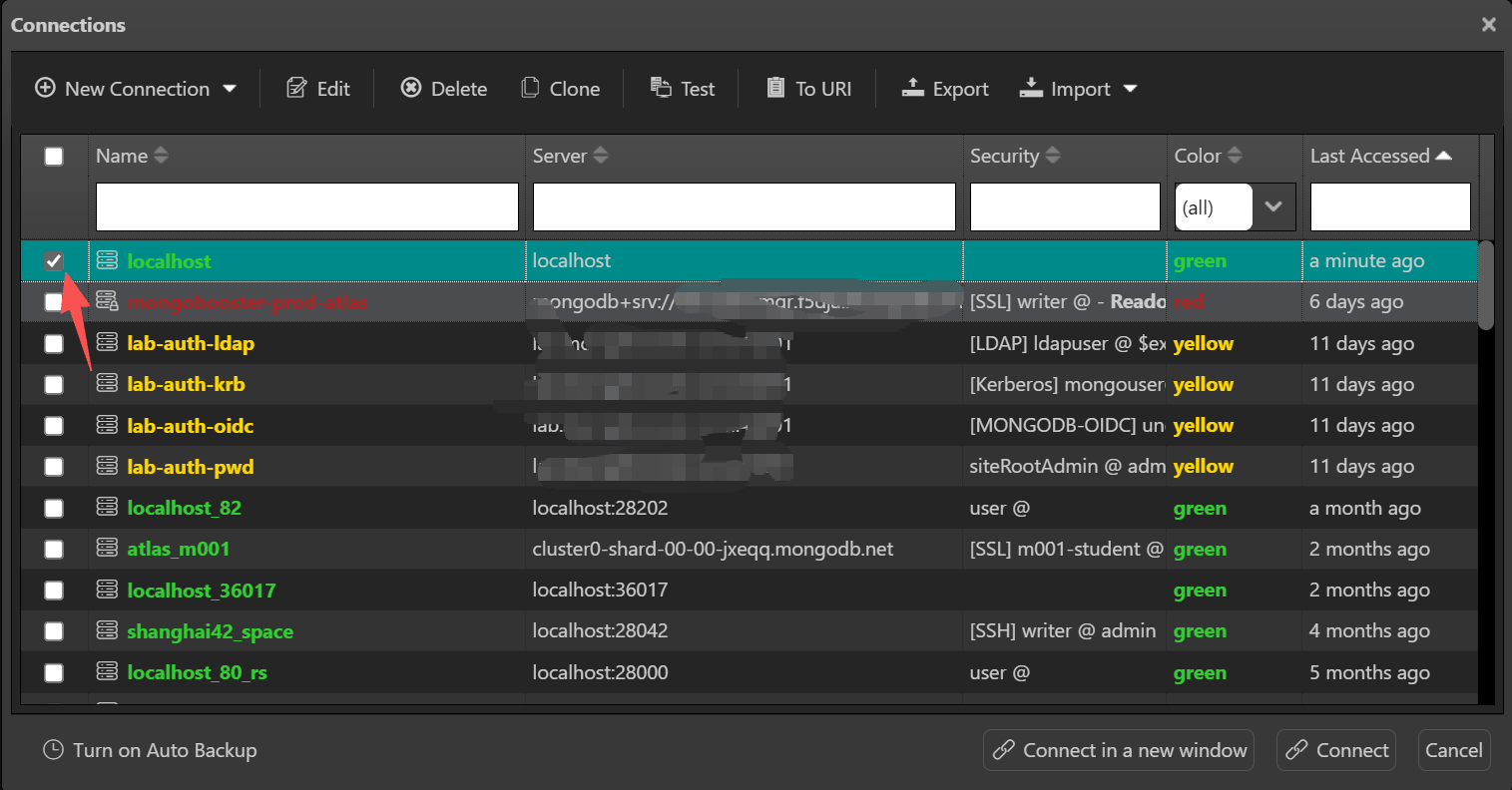
- Multi-select with checkboxes — a new checkbox column lets you select multiple connections at once. Bulk actions such as Delete, Copy URI, and Export now operate on all checked connections, while Connect, Edit, and Test Connection act on the focused row.
- Batch-connect confirmation — connecting to more than one selected connection now shows a confirmation prompt first, preventing accidental mass connections.
- Double-click to connect — double-clicking a connection row now opens it directly (with a confirmation), while double-clicking inside the checkbox area only toggles selection instead of connecting.
- Dynamic window titles — the Connection Editor title now reads "Connection Editor - <connection name>" and updates live as soon as you rename and save. The Test Connection dialog title is likewise formatted as "Test Connection - <connection name>", so it's always clear which connection you're working on.
Faster Tree View with Virtual Scrolling
The Tree View data browser now renders through virtual scrolling. Only the rows currently visible in the viewport are rendered to the DOM, so browsing large result sets in Tree View stays smooth and responsive no matter how many documents are returned.
- Virtualized row rendering — DOM node count stays low even for very large collections, keeping scrolling fluid and reducing memory usage.
- Stable scroll position — expanding or collapsing nodes no longer jumps the view back to the top; your browsing position is preserved (and retained across window resizes).
- Aligned frozen columns — frozen columns stay correctly synced with the main view during virtual paging, with no drift or blank rows.
Persistent AI Chat Panel State
The collapsed/expanded state of the AI Chat panel is now remembered reliably across restarts. Previously this state was stored only as part of the workspace snapshot, which required "Restore Last Working State" to be enabled and relied on a delayed restore that could occasionally fail. The panel state is now persisted immediately whenever you change it and restored on startup independently of the workspace-restore setting.
Smarter Data Viewer Selection Sync
When switching between Table View (AG-Grid) and Tree View (TreeGrid), the currently selected document is now carried over so the target view highlights the same record — and the Document Viewer stays in sync as well. Previously, switching modes could leave the new view with no selection or a stale one. Selection is also cleared automatically when a new query is executed, avoiding mismatches against fresh result sets.
MongoDB Compass Query Interoperability
NoSQLBooster makes it effortless to move queries between MongoDB Compass and the NoSQLBooster script editor. Paste a bare filter or pipeline copied from Compass as a standalone line, and NoSQLBooster auto-wraps it into a complete, runnable statement for the collection currently in use.
For example, a filter copied from Compass's query bar:
1 | { status: "active", age: { $gte: 18 }, "address.city": "New York" } |
is instantly turned into a ready-to-run query:
1 | db.users.find({ status: "active", age: { $gte: 18 }, "address.city": "New York" }) |
An aggregation pipeline from Compass's aggregation builder:
1 | [ |
is auto-wrapped the same way:
1 | db.orders.aggregate([ |
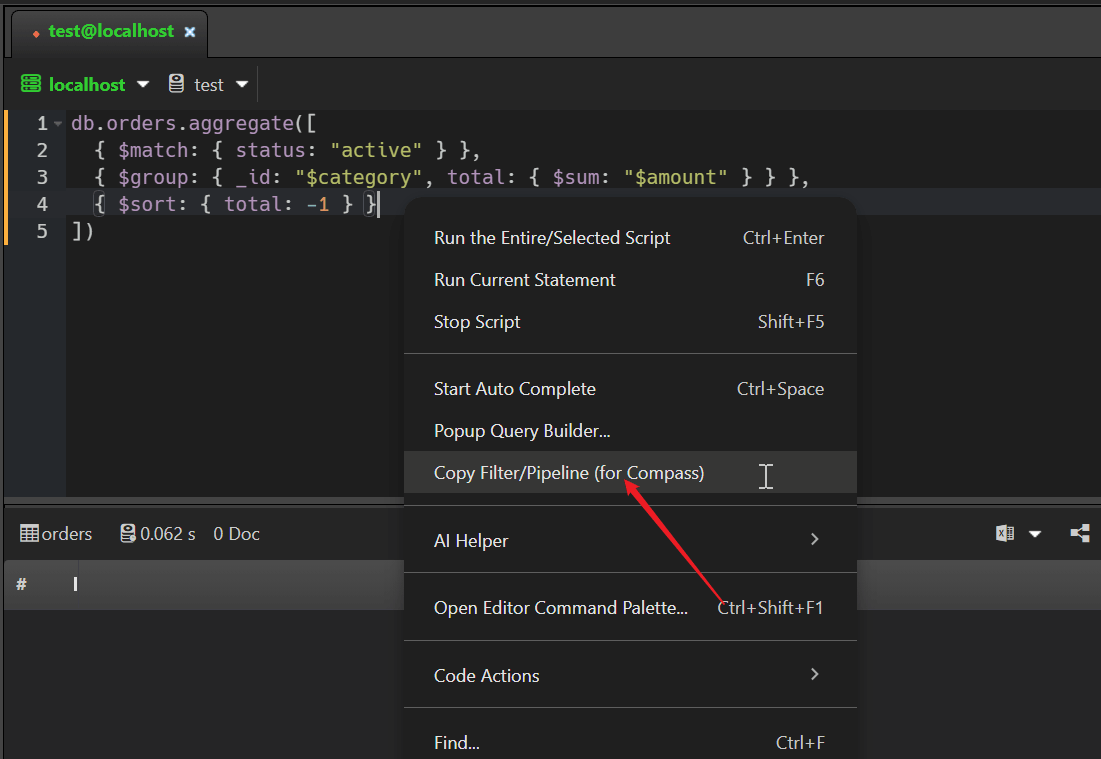
In the opposite direction, the editor's context menu now offers "Copy Filter/Pipeline (for Compass)", which extracts the filter or pipeline of the current find / findOne / aggregate statement — including fluent query chains such as db.collection.find().sort().limit() — so you can drop it straight back into Compass.
The auto-wrap only applies when it is safe to do so: in the user's own script editor, on a standalone line (not inside an unclosed expression, string, or comment), and with a resolvable collection — otherwise the text is pasted as-is.
Optimized Connection Defaults
Two default MongoDB driver options have been tuned for a better desktop GUI experience. These only affect connections that don't explicitly override the options, and can be restored via the connection string or the "More" tab at any time.
| Option | Old Default | New Default | What you'll notice |
|---|---|---|---|
serverSelectionTimeoutMS |
30000 (30s) |
15000 (15s) |
Unreachable servers fail faster, reducing long "spinning" waits |
maxIdleTimeMS |
0 (never recycle) |
300000 (5 min) |
Idle connections are recycled after 5 minutes, freeing resources after you switch away; active sessions are unaffected |
To restore the previous behavior, add ?serverSelectionTimeoutMS=30000&maxIdleTimeMS=0 to your connection string.
New Portable Edition (Windows)
NoSQLBooster 11.1 introduces a new portable ZIP edition for Windows, distributed as nosqlbooster4mongo-11.1.0-x64-portable.zip. Just unzip it and run — no installer, no administrator rights, and no changes to the system registry. It's ideal for locked-down enterprise environments, running from a USB drive, or keeping multiple versions side by side.
- Self-contained data — instead of writing to
%APPDATA%, the portable edition keeps all of its data (connections, settings, window state, cookies, cache, etc.) in a.nosqlbooster-datafolder right next to the executable. Move the folder and your entire environment comes with it. - No footprint on the host — nothing is installed or left behind on the machine, so the same copy can travel between computers.
- Update notifications — because the portable edition has no installer infrastructure, the built-in auto-updater is disabled. Instead, it notifies you of any new version (including minor and patch releases) and directs you to the download page to grab the latest ZIP manually.
The installed editions (
.exe/.msi) continue to work exactly as before and are unaffected by this change.
Updated Platform and Engine
NoSQLBooster 11.1 moves to a newer Electron/Chromium runtime and refreshes the MongoDB driver stack to stay aligned with the latest mongosh release.
| Component | Version 11.0 | Version 11.1 |
|---|---|---|
| Electron | 40.9 | 43.1 |
| Chromium | 134 | 150 |
| Node.js | 22.x | 24.x |
| MongoDB Node.js Driver | 7.2 | 7.4 |
| BSON | 7.0 | 7.2 |
| OIDC Plugin | 2.0.8 | 2.2.0 |
The newer Chromium engine brings the latest rendering and security improvements, and the refreshed driver stack keeps NoSQLBooster in step with the mongosh 2.9 line. All native modules (Kerberos, Snappy, Zstd, client-side field-level encryption, etc.) have been verified compatible with Electron 43.
Bug Fixes
- Fixed, case-sensitive email validation in the license registration form. Emails containing uppercase letters (e.g.
Devin.Grant@example.com) were incorrectly rejected; the validator is now case-insensitive. - Fixed, document selection was lost when switching between Table View and Tree View, and the Document Viewer no longer stayed in sync — selection is now transferred correctly across all views.
- Fixed, AI Chat panel collapsed state could be lost on restart when "Restore Last Working State" was disabled.
- Fixed, tree-view node state handling and internal caching, and removed the deprecated row-id column that could cause inconsistent row rendering.
Patch Releases
Version 11.1.1
Fixed, cross-connection copy/paste being incorrectly blocked by readonly mode — when copying a database or collection from a read-only source connection to a writable target, the readonly validation could mistakenly reject writes aimed at the target (e.g. index creation,
mb.writeToDb, or import operations failing with a "connection is read-only" error). The check was consulting stale global connection state left behind while reading the source's indexes; it now always validates against the connection that actually performs the write.Fixed, readonly mode being bypassed for connections whose settings changed recently — if a connection was switched to read-only while NoSQLBooster still held an internal cached connection handler, operations such as Paste Database could still write to it. The read-only flag is now re-synced from the saved connection settings every time the connection is used.
Fixed, GridFS write operations bypassing readonly mode — uploading, editing, or deleting GridFS files on a read-only connection was previously allowed because these operations used a low-level API that skipped the readonly check. They are now correctly blocked, while downloads and file reads remain allowed.
Improved, readonly feedback in the connection tree — when the target connection is read-only, the Paste Database / Paste Collection context menu items are now disabled and labeled "(Readonly Connection)", and the Ctrl+V shortcut shows a clear warning instead of starting an operation that would fail.
Version 11.1.2
Fixed, a remaining case of cross-connection copy/paste from a read-only source to a writable target — index creation on the writable target could still fail with a "the current connection is read-only" error, because reading the read-only source's indexes left behind a shared internal API reference. Each connection now uses its own validation, so copying to a writable target completes correctly.
Fixed, on macOS, workspace state was sometimes lost when quitting the app. Connections you had disconnected and tabs you had closed could reappear on the next launch, because the app was terminated before the latest state finished saving. Workspace state is now reliably persisted before exit, so NoSQLBooster restarts in exactly the state you left it.
Version 11.1.3
Added, About dialog — a new Help ▸ About NoSQLBooster dialog shows the product version, copyright, and complete license information (license status, licensed to, license type, owner email, and Software Assurance status with expiry), and also hosts the license deactivation action that previously lived on the Help menu. Trial and free users get clear license-status feedback in the same place.
Added, MongoDB Compass query interoperability:
- Pasting a bare Compass filter (
{...}) or pipeline ([{...}]) into the script editor as a standalone line now auto-wraps it into a completedb.<collection>.find(...)/aggregate(...)statement — no more manual wrapping. - The editor's context menu gains "Copy Filter/Pipeline (for Compass)", which extracts the filter or pipeline of the current
find/findOne/aggregatestatement — including fluent query chains such asdb.collection.find().sort().limit()— to the clipboard for direct use in MongoDB Compass.
- Pasting a bare Compass filter (
Fixed, Windows app no longer auto-relaunching after an update — the NSIS installer relaunches the app with a
--updatedstartup flag that was mistaken for an invalid CLI argument, so the freshly updated app exited immediately instead of reopening. The flag is now ignored and the app restarts normally after an update.Fixed, import/export tasks failing with a misleading error when their connection is gone — when the connection referenced by a scheduled import/export task has been deleted or renamed, the task now shows a clear message identifying the missing connection and asking you to re-select one, instead of a confusing
Cannot read properties of undefinederror.Fixed, macOS in-app auto-update failing with "ZIP file not provided" — version 11.1.2 shipped DMG-only packages, but the macOS auto-updater can only install ZIP archives, so Mac users could not update from within the app. Version 11.1.3 ships the ZIP packages the updater expects, restoring automatic updates on macOS.
Fixed, code completion for aggregation stage methods after
.aggregate()chains — typingdb.collection.aggregate().no longer offered completions for the fluent stage methods (.lookup(),.group(), ...), because those methods are declared on the generic interfaceIPipelineStages<IAggregateCursor>. The generic declaring types are now recognized and the missing stage-method completions are restored, so aggregation chains get full inline hints again.Fixed, dotted field names selected from code completion now insert quoted — choosing a field such as
address.cityfrom the index-driven completion list inserted it unquoted, so MongoDB treated it as a nested path (address→city) instead of the literal field name. Such fields are now wrapped in quotes automatically.
Version 11.1.4
Fixed, Copy Field Path / Copy Field-Value Pair now output strict JSON — copying a field path from the data viewer (including nested fields such as
address.cityand array indexes) previously inserted it unquoted, so the copied text was not a valid JSON key. Field paths are now wrapped in double quotes, making the copied output always a valid, ready-to-use JSON key.Fixed, trial status shown incorrectly in the bottom status bar — during the 30-day trial period the status bar displayed "Free Edition"; it now correctly shows "Trial" with the number of days left in the tooltip, and switches to "Free Edition" automatically once the trial expires. The About dialog status row is now consistent with the status bar, showing "Free Edition" instead of "Trial Expired" after expiry.
Fixed, connections with an explicit SCRAM-SHA authentication mechanism were wrongly rejected — when a connection string explicitly set
authMechanism=SCRAM-SHA-1orSCRAM-SHA-256(as MongoDB Atlas SRV URIs or the "More" tab URI options commonly do), the license check mistakenly flagged the connection as requiring a Commercial License and refused to connect. The redundant mechanism is now stripped before the license check and the driver auto-negotiates it, so such connections work normally again.Fixed, code completion for cursor operator methods missing after generic declaring types — with the embedded
@nosqlbooster/ace-typescriptpackage updated to 10.1.0, snippets for cursor operator methods (find(),aggregate(), ...) failed to trigger when the declaring type uses a generic form such asIQueryOperator<mongo.ICursor>. The generic declaring types are now recognized, so query-chain completions work reliably again.
Version 11.1.5
Added, automatic recovery from renderer process crashes — if the renderer process crashes (out-of-memory, killed by the OS under memory pressure, or a GPU crash), NoSQLBooster now recovers the window automatically instead of leaving a permanent white screen. To prevent an endless crash loop, auto-recovery pauses after several crashes within a short window and notifies you; once the app stabilizes, recovery resumes on its own. Crash details are recorded in a log file for troubleshooting, and a new
--no-restore-workspacestartup argument lets you launch cleanly from the command line (skipping the last-session restore) if the app is stuck in a restart loop.Improved, update notification redesigned as a floating banner — a downloaded update no longer pops up a modal dialog that interrupts your work. A non-intrusive "New version ready" banner now appears at the bottom of the window with an Update Now button (guarded against double-clicks) and a Release Notes link that jumps directly to the matching version section on the release blog. The banner can be dismissed at any time without affecting the automatic install on exit, and the update dialog title now always shows the product name instead of falling back to "Electron" in some install modes.
Fixed, code-completion engine update resolving a major memory usage and crash problem — the embedded
@nosqlbooster/ace-typescriptengine is updated to 10.1.2. Version 10.1.0 had accidentally shipped with browserify Node.js shims baked into its release bundle; their incompatible behavior (path.resolve,setImmediate, ...) crashed the renderer process when running scripts across many data-viewer tabs — matching reports of a crash or white screen after opening 8–9 tabs — and inflated memory usage. The bundle is now built clean again (--bare, shims removed) with an automated guard added to prevent this regression, so multi-tab script execution is stable again and memory usage returns to normal.Fixed, outdated license deactivation instructions — the activation-limit message pointed to a "Deactivate and Delete the License on This Computer" Help menu item that no longer exists. It now correctly guides you to Help ▸ About and the Deactivate License... button inside the About dialog.
Version 11.1.6
Added, early MongoDB 9.0 support — NoSQLBooster now connects to MongoDB 9.0 servers ahead of that version's official release. Such connections were previously rejected with a "server version not supported" error.
Fixed, in-app automatic updates getting stuck on the publisher-signature check — the publisher name in the update metadata could be garbled when the code-signing certificate's Chinese subject name was mis-decoded, so the updater's publisher validation failed and the update never completed (leaving some users unable to finish the 11.1.4 → 11.1.5 update). The publisher check no longer blocks updates, so automatic updating completes reliably again.
Fixed, on macOS, the emoji marker of the selected connection tab was misaligned with its title — a bottom-alignment style made the emoji and the tab title text line up vertically (one above the other) instead of side by side. The emoji is now vertically centered with the title, consistent with the Windows rendering.
Version 11.1.7
Added, official support for MongoDB 9.0 — now that MongoDB 9.0 has been released, NoSQLBooster officially supports MongoDB 9.0 servers, extending the overall supported server range to MongoDB 3.6 through 9.0. Early support was introduced in 11.1.6 ahead of the release.
Added, validation rules generated from an analyzed collection schema — the
validatornode of a collection now offers two new commands in the connection tree:- Generate Rules (MongoDB 3.6 or later) builds a complete
$jsonSchemavalidator script from the analyzed collection schema and opens it in a new tab for review — it is never executed automatically. If the collection has not been analyzed yet, NoSQLBooster offers to analyze it on the spot, sampling the most recent 1,000 documents, instead of sending you to the Schema Explorer; the Re-analyze schema checkbox forces a fresh analysis. - If the collection already has a
$jsonSchemavalidator, the generated rules are merged with it: existing field constraints (required,minLength/maxLength,pattern,enum,description, ...), nested object and array item definitions are preserved,requiredis unioned, and the analyzed field types take precedence — so carefully tuned rules are not silently thrown away. A validator in any other form cannot be merged, and the confirmation dialog warns that the generated script will overwrite it. - Drop Validator prepares a
collModscript that clears the collection's validation rules (also not executed automatically), after which the node correctly returns to its(empty)state. - The confirmation dialog states up front that every field found in the sampled documents is marked as
required, so rules that could reject existing documents are never applied without warning. Double-clicking thevalidator (empty)node starts the same guided flow.
- Generate Rules (MongoDB 3.6 or later) builds a complete
Fixed, reassigning a shortcut key to a command that already owned it silently did nothing — after assigning an already-used key to another command in the Shortcut Mapper, the key showed up in the mappings but pressing it had no effect (reported on Windows after reassigning F6 to "Clean Result Tabs and Run Current Statement"), and restarting the app did not help. Keys are now released before new bindings are created, so conflicting reassignments work immediately, and configurations saved in the wrong order repair themselves on the next launch. Applying Reset to Default together with a conflict-clearing change no longer loses the shortcut either.
Fixed, connections to MongoDB 3.6 failing to authenticate — when a 3.6 server does not advertise its supported authentication mechanisms, the driver defaulted to SCRAM-SHA-256 with no fallback, so such connections could not be saved or opened. They now negotiate SCRAM-SHA-1; MongoDB 4.0 and later are unchanged.
Fixed, Run Current Statement extracting the wrong statement from documents with Windows line endings — with CRLF line endings the extracted statement started on the previous line and was cut off at the end, so running it failed with a "TypeScript transformation failed: Unexpected token" error. The embedded
@nosqlbooster/ace-typescriptengine is updated to 10.1.3, which converts positions correctly between the text the language service sees and the document's actual CRLF content.Fixed, Compass filters/pipelines pasted for collections whose names start with
_or$producing broken scripts — such collections (for example_SIMAH_Elected) were wrapped asdb._SIMAH_Elected.find(...), which is alwaysundefinedin the mongosh engine because underscore-prefixed properties are reserved for internal use ($-prefixed names and names that collide withdbmethods cannot be used that way either). These names now use thedb.getCollection("...")form, and the same rule drives the collection declarations behind editor code completion.Improved, Add/Modify Validator documents the MongoDB 9.0
constraintvalidation level — the template and completion now includeconstraintin thevalidationLevelvalues (off | strict | moderate | constraint) along with its restrictions: it requiresvalidationActionerror/errorAndLog, and cannot be changed in the samecollModas the validator itself.Improved, embedded shell engine updated to mongosh 2.10.0 — the shell runtime and its type definitions/completion are now in sync with the latest mongosh: helpers such as
sh.txnStatus(),sh.shardDrainingStatus(),sh.getTransitionToDedicatedConfigServerStatus()and filteredsh.listShards({draining: true})are available, as is the MongoDB 8.3arrayIndexAsoption of$filter,$mapand$reduce.
Thank you!
Please visit our feedback page or click the “Feedback” button in the app. Feel free to suggest improvements to our product or service. Users can discuss your suggestion and vote for and against it. We’ll look at it too.