Can I use node modules in MongoBooster? I want to use axios in my script. And, Do I have to install node module globally?
Answer:
Yes, You can use pure JS node modules in MongoBooster. And, you don't need to install node modules globally.
Launch MongoBooster.
Execute Main Menu -> Help -> Open the Executable Directory (or "Open User Data Directory" in the old version)
New Terminal at this folder
1
npm i axios # run it in MongoBooster user data directory
After successfully installing this package in the MongoBooster User Data Directory, you can require and access it in the MongoBooster script.
1
2
3
const axios=require("axios");
let rst=await (axios.get('https://api.github.com/users/github'));//await promise The "await" is a build-in method in MongoBooster. refer to: https://www.nosqlbooster.com/blog/using-functions-with-async-callback
console.log(rst.data);
We're having a situation where we want to call a function with an async callback. The issue that arises is that the script thread terminates before the callback is executed. Is there any way to prevent the script thread from terminating before we get the callback?
Background:
We're intending to read a collection containing phone numbers, call Twilio Api (an sms service) to send a message, and finally store the status from Twilio into another collection.
1
2
3
4
5
db.users.find({...}).forEach((user) => {
  sendSms(user.phone, "A short message", (status) => {
    db.smsDeliveries.insert(status);
  });
});
Answer:
MongoBooster has a build-in function await (It's a common js method, not a keyword). It can await a promise or a promise array. Note this await function is different from es7 await, this await function may be used in functions without the async keyword marked.
db.users.find({}).forEach((user) => { let status=await(sendSmsAsync(user.phone, "A short message")); //await a promise db.smsDeliveries.insert({status}); });
So happy to release MongoBooster 3.5 today. This version distributes Linux application in the AppImage format, add Azure DocumentDB support along with some useful minor improvements and bugfix.
Hotfix in MongoBooster 3.5.7
improved: SSH connection config UI
fixed: a "use db" bug in copying collection
fixed: missing "," issue when exporting collection to MySQL as SQL format
fixed: throw subCollection.getCollection is not a function error while executing script "db.getCollection("xxxx.group.xxxx").find({})"
fixed: A Javascript JSON.parse error occurred in the main process while reading "window-state-main.json"
fixed: connection close issue when calling discoverReplicaSet
Hotfix in MongoBooster 3.5.6
added: Short cut "Mod+0" - "toggle Output Panel" to maximize the script editor.
added: Short cut "Mod+9" - "toggle Editor Panel" to maximize the output panel.
improved: Update node version to 7.4.0
fixed: Create new shell tab button is not visible in dark theme
fixed: Missing icons in dark theme
fixed: Can see HTML source in Replica Set Members header
Hotfix in MongoBooster 3.5.5
fixed: should not sort by property name on a getIndex
fixed: "Query by example" doesn't work with nested array
fixed: can't add double/integer value into the nested array.
fixed: import JSON file which only contain single JSON object doesn't work.
Hotfix in MongoBooster 3.5.4
fixed: shell tab can't be closed when the tab name includes space char.
fixed: mongotools 3.4.2 compatibility issue
Hotfix in MongoBooster 3.5.3
fixed: Kerberos Library is not installed issue.
fixed: database with name "<DATABASE>" maked problems
improved: add bluebird Promise typings
Hotfix in MongoBooster 3.5.2
fixed: Error connecting to Mongodb Atlas replicaset.
improved:Upgrade MongoDB driver to the latest version 2.2.24
Linux AppImage format
This version packages desktop applications as AppImages that run on common Linux-based operating systems, such as RHEL, CentOS, Ubuntu, Fedora, debian and derivatives. An AppImage is a downloadable file for Linux that contains an application and everything the application needs to run (e.g., libraries, icons, fonts, translations, etc.) that cannot be reasonably expected to be part of each target system.
So happy to release MongoBooster 3.3 today. This version includes a few useful shell script extensions (cursor.getShellScript, cursor.saveAsView...) along with some useful minor improvements and bugfix.
shell script extensions
cursor.getShellScript()
Cursor.getShellScript() method return the MongoDB find shell script produced by the MongoBooster Fluent Query Builder.
For example:
Run the following Fluent query script in MongoBooster:
1
2
3
4
5
6
db.user.where('age').gte(18).lte(65)
       .select('name age -_id')
       .sort("-age name")
       .limit(5)
       .skip(100)
       .getShellScript()
We're so proud to release Mongobooster 3.2 today. This version includes official support for MongoDB 3.4 along with some useful minor improvements and bugfix. For more information on MongoDB 3.4 , see Release Notes for MongoDB 3.4.
Changed: default "Tab Name Format" to "Database:Collection"
Changed: loosen the restriction - Test Data Generator restricts to test database.
Changed: loosen the restriction -Read-only status lock restricts to localhost:27017 connection
Hotfix in MongoBooster 3.2.2
Fixed: missing edit icon in the dark theme
Fixed: windows freezes or stops responding when SSH connection lost (Windows platform only)
MongoDB 3.4 support
MongoBooster 3.2 adds support for all the new shell methods and operations of MongoDB 3.4. Sharding Zones, Linearizable Read Concern, Decimal Type, New Aggregation Stages, Views, and Collation.
New Aggregation Stages
MongoDB 3.4 adds a few aggregation stages for Recursive Search, Faceted Search, Facilitate Reshaping Documents, Count and Monitor. In MongoBooster 3.2, all new aggregation stages can be used as the chainable methods, rather than specifying a JSON object.
This version includes query by example, ReplicaSet discover members, export query and selected documents can choose fields and export to sql, improved connection config other options editor along with some useful minor improvements and bugfix.
Hotfix in MongoBooster 3.1.5
Changed: Bind shortcut F5 to “Run/Execute Current Statement”, replacing F4.
New: CTRL+F5 to execute the current statement into a new tab sheet.
New: CTRL+F6 to execute the entire/selected script into a new tab sheet.
Improved: Sort exported fields by name in the export dialog
Improved: Auto-fetch all fields for the small-size collection (< 2M)
Fixed: An autocomplete malfunction bug for the local connection after trial expired
Hotfix in MongoBooster 3.1.3
Changed, In order to keep the behavior consistent with mongodb shell, MongoBooster will insert/update number as double type.
We're so proud to release Mongobooster 3.0 today. In this brand new version, it gets more and more useful with our full-featured shell and several new tools.
New free edition added with Mongobooster 3.0, this free edition is free for personal/commercial use but limited function.
Schema Analyzer
Schema Analyzer is a very useful build-in tool. Due to schema-less feature, collections in MongoDB do not have a schema document to describe field's datatype, collection structure and validations. With our brand new Schema Analyzer Tool, you will get a document to describe the schema of certain collection from sampled(random, first, last) N or all records.
The document shows the probability of sampled objects , different types percentage, you could get a brief of certain collection's schema. If you want more accurate result, you could sample more records or analyze whole collection, but it may took a long time to finish if the collection has millions records or thousands fields.
It also shows document validation of the collection, which is a new feature in MongoDB 3.2. There will be a validator window showing below the document. If you click the link, field will be highlighted in the window.
You could export this document to most popular document file types, like MS Word, PDF, HTML, along with JSON, TXT and CSV. Mongoose.js schema file supported as well. Sample file
Today, we're thrilled to announce the release of MongoBooster 2.3. This release includes significantly improved console.log/print tab, JSON view format options, bug fixes and a few minor improvements.
Improved console.log/print tab
The brand-new, improved console.log/print Tab collects all output messages in only one tab, instead of showing them in separated tabs. You can find and view these messages much easier than before. The elapsed time shows when the message occurs during the whole script execution.
Today, we're happy to announce the release of MongoBooster 2.2. This release includes Real-Time log viewer, tree/table view sorting options, shell tab title format options, bug fixes and a few minor improvements.
Real-Time log viewer
Instead of showing a simple loading spinner, this release add a new log viewer to show the real-time console log/ print info. When the shell script execution time exceeds 2 seconds, the log window will be popped up and monitor script logs at real-time.
It's time to update MongoBooster again :) This is a smaller update in terms of raw added features – but this release includes better Quick Find, bug Fixes and a few minor improvements.
Quick Find
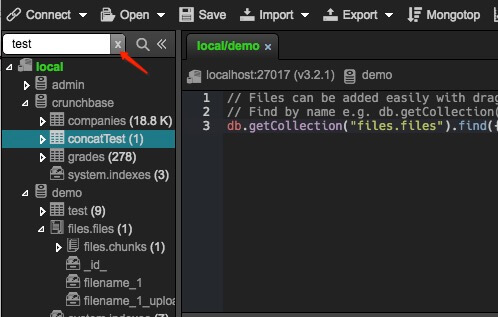
Quick Find to symbol with (⌘+F|CTRL+F) provides the possibility to get to any database and collection object in the connection tree view. In this release, there are a few minor improvements for Quick Find with connection tree.
add a close "x" button in the right corner of the Quick-find input box.
Press "Mod+F" will focus to input-box rather than closing it.
Press "ESC" will close Quick-find input box and focus to connection instead of focusing script editor.